 51工具盒子
官网的登陆注册每次要跳转到另一个界面,能不能做一个简单的,在界面弹出一个框框登陆,我想了想做了这么一个案例,大家来看看成不成
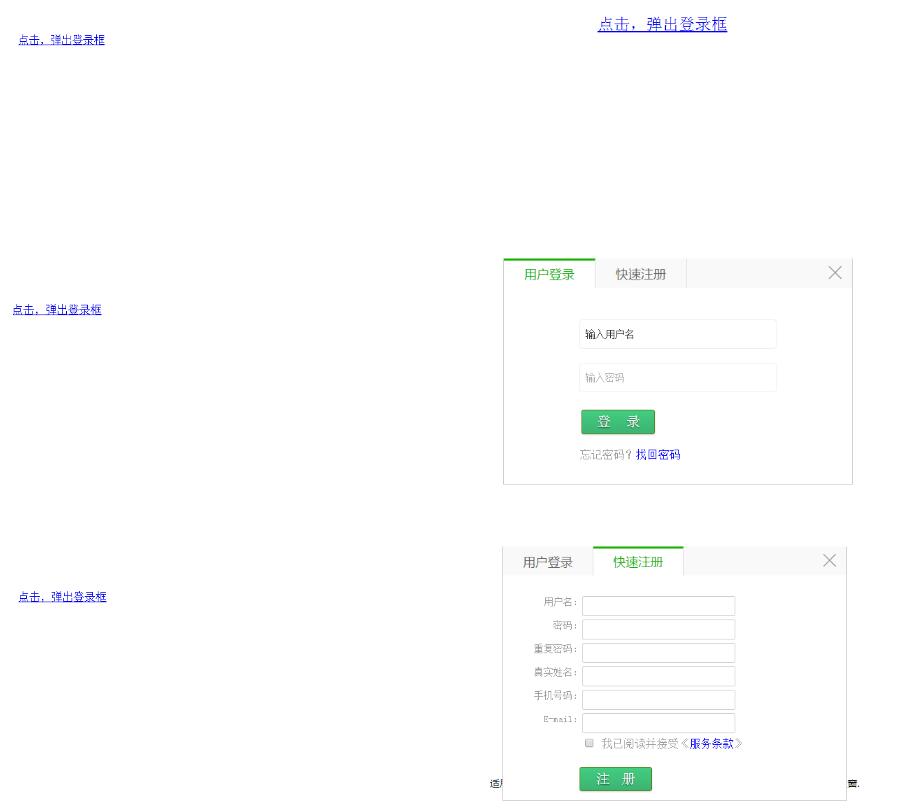
贴上代码,实现了在同一个弹出窗上加载了登陆注册功能!可自由点击!当然样式丑了一些!还请见谅!demo在下面
1这里是html内容
<!DOCTYPE html PUBLIC "-//W3C//DTD XHTML 1.0 Transitional//EN" "http://www.w3.org/TR/xhtml1/DTD/xhtml1-transitional.dtd">
<html xmlns="http://www.w3.org/1999/xhtml">
<head>
<meta http-equiv="Content-Type" content="text/html; charset=utf-8" />
<title>jQuery鼠标点击弹出登录框代码</title>
</head>
<body>
<br><br><br><br><br><br><br>
<div class="login-header"><a href="javascript:void(0);">点击,弹出登录框</a></div>
 <div class="login-header1"><a href="javascript:void(0);">点击,弹出登录框</a></div>
<div id="js_login" class="js_login">
<div class="js_title">
<ul>
<li class="conxk1" id="_xka1" onclick="switchTag('_xka','_xka_list',1,2,'conxk1','conxk2');">
用户登录
</li>
<li class="conxk2" id="_xka2" onclick="switchTag('_xka','_xka_list',2,2,'conxk1','conxk2');">
快速注册
</li>
</ul> <span class="close-login">×</span>
</div>
<div class="js_content">
<div class="con_dak fixed clear">
<div id="_xka_list1" class="showbox">
<div class="de_list">
<!----------login start------>
<div id="login">
<div class="inputbg" id="logtext">
<input name="logusername" id="logusername" type="text" value="输入用户名" placeholder="输入用户名" class="inputsub" />
</div>
<div class="inputbg" id="pass">
<input name="logpassword" placeholder="输入密码" type="password" value="" id="logpassword" class="inputsub" />
</div>
<div class="buttons">
<input type="button" class="sub_btn1" id="login-submokaoba" onclick="ajaxlogin()" value="登 录" />
</div>
<div class="clr"></div>
<div class="reg">
忘记密码?<a href="http://www.mokaoba.com/">找回密码</a> <span id="errmsg"></span>
</div>
</div>
<!--------login end--------->
</div>
</div>
<div id="_xka_list2" class="hidden">
<div class="de_list">
<!--------register start--------->
<form method="post" enctype="multipart/form-data" name="userinfoform" id="userinfoform">
<input type="hidden" name="enews" value="register" />
<input name="groupid" type="hidden" id="groupid" value="1" />
<div id="register">
<ul class="Reg-input">
<li class="Reg-text">用户名:</li>
<li><input name="UserName" id="UserName" type="text" class="input-text" required="" /> <span class="UserName"></span></li>
</ul>
<ul class="Reg-input">
<li class="Reg-text">密码:</li>
<li><input name="Password" onblur="CheckReg('Password', this.value)" type="password" id="Password" class="input-text" required="" /> <span class="Password"></span></li>
</ul>
<ul class="Reg-input">
<li class="Reg-text">重复密码:</li>
<li><input name="repassword" onblur="CheckReg('repassword',this.value)" type="password" id="repassword" class="input-text" required="" /> <span class="repassword"></span></li>
</ul>
<ul class="Reg-input">
<li class="Reg-text">真实姓名:</li>
<li><input name="RealName" onblur="CheckReg('RealName', this.value)" type="text" id="RealName" class="input-text" required="" /> <span class="RealName"></span></li>
</ul>
<ul class="Reg-input">
<li class="Reg-text">手机号码:</li>
<li><input name="Telephone" onblur="CheckReg('Telephone', this.value)" type="text" id="Telephone" class="input-text" required="" /> <span class="Telephone"></span></li>
</ul>
<ul class="Reg-input">
<li class="Reg-text">E-mail:</li>
<li><input name="Mail" onblur="CheckReg('Mail', this.value)" type="text" id="Mail" class="input-text" required="" /> <span class="Mail"></span></li>
</ul>
<ul class="Reg-input">
<li class="Reg-text"> </li>
<li id="checkbox"><input type="checkbox" id="checkin" onclick="checkpass('all')" /> 我已阅读并接受《<a href="/http://www.jiao4.com/javascript" target="_blank">服务条款</a>》</li>
</ul>
<div style="clear:both"></div>
<div class="buttons">
<input type="button" class="sub_btn1" id="Reg-submokaoba" onclick="ajaxzhuce()" name="zhuce" value="注 册" />  <span id="checkreg"></span>
</div>
<div class="clr"></div>
</div>
</form>
<!--------register end--------->
</div>
</div>
</div>
</div>
</div>
<div class="login-bg"></div>
</body>
</html>
2接下来是样式css
@charset "utf-8";
 /*/////*登陆//////by liangguanyu/////*/
 .js_login h1, h2, h3, h4, h5, h6, p, ul, li {
 padding: 0;
 margin: 0;
 list-style: none;
 }
.login-header {
text-align: center;
height: 30px;
font-size: 24px;
line-height: 30px;
}
.js_login {
display: none;
position: fixed;
opacity: 1;
z-index: 11000;
left: 50%;
margin-left: -250px;
top: 100px;
}
.js_login a {
color: blue;
text-decoration: none;
}
.sub_btn1 { /position:absolute; right:0px; top:50px;/
width:105px;
height:35px;
display: inline-block;
zoom: 1; /* zoom and display = ie7 hack for display:inline-block /
display: inline;
vertical-align: baseline;
margin: 0 2px;
outline: none;
cursor: pointer;
text-align: center;
align-content:center
font: 15px/100% Arial, Helvetica, sans-serif;
text-shadow: 0 1px 1px rgba(0,0,0,.6);
-webkit-border-radius: 3px;
-moz-border-radius: 3px;
border-radius: 3px;
-webkit-box-shadow: 0 1px 2px rgba(0,0,0,.2);
-moz-box-shadow: 0 1px 2px rgba(0,0,0,.2);
box-shadow: 0 1px 2px rgba(0,0,0,.2);
color: white; /#e8f0de/
border: solid 1px #538312;
background: #64991e; / #64991e*/
background: -webkit-gradient(linear, left top, left bottom, from(#43CD80), to(#3CB371)); /#7db72f #4e7d0e/
background: -moz-linear-gradient(top, #7db72f, #4e7d0e);
filter: progid:DXImageTransform.Microsoft.gradient(startColorstr='#7db72f', endColorstr='#4e7d0e');
}
.sub_btn1:hover {
background: #538018;
background: -webkit-gradient(linear, left top, left bottom, from(#2E8B57), to(#008B45));
background: -moz-linear-gradient(top, #6b9d28, #436b0c);
filter: progid:DXImageTransform.Microsoft.gradient(startColorstr='#6b9d28', endColorstr='#436b0c');
}
.inputbg {
height: 40px;
width: 280px;
margin: 0 auto;
margin-top: 20px;
border-radius: 4px;
border: 1px solid #eee;
text-align: left;
color: #333;
}
#username * {
vertical-align: middle;
}
.inputsub {
outline: 0;
font-family: Tahoma,Geneva,sans-serif;
font-size: 14px;
width: 270px;
float: left;
border: none;
text-align: left;
color: #333;
margin: 10px 0 3px 8px;
background: none;
overflow: hidden;
}
.buttons {
width: 280px;
margin: 0 auto;
margin-top: 25px;
text-align: left;
}
#login-submokaoba {
width: 105px;
height: 35px;
}
#qql {
float: right;
}
.reg {
padding: 20px;
margin: 0 auto;
width: 280px;
}
#login {
margin-top: 20px;
}
.hidden {
display: none;
}
.js_login {
position: absolute;
width: 500px;
background: #fff;
display: none;
color: #999;
}
.js_login .js_title {
overflow: hidden;
height: 42px;
background: #f9f9f9 url(http://www.jiao4.com/java) repeat-x;
border-left: 1px solid #ccc;
border-right: 1px solid #ccc;
}
.js_login .js_title span {
float: right;
line-height: 40px;
padding: 0 9px;
cursor: pointer;
font-family: "";
font-size: 30px;
}
.js_login .js_title span:hover {
color: #555;
}
.js_login .js_title li {
float: left;
width: 130px;
text-align: center;
font-family: "微软雅黑";
font-size: 18px;
cursor: pointer;
height: 43px;
}
.js_login .js_title li a {
float: left;
width: 130px;
text-align: center;
}
.js_login .js_title li a:hover {
}
.conxk1 {
border-top: 3px solid #15B300;
border-right: 1px solid #dfdfdf;
background: #fff;
height: 39px;
line-height: 39px;
color: #11B200;
}
.conxk1 a {
color: #11B200;
}
.conxk1 a:hover {
color: #11B200;
text-decoration: none;
}
.conxk2 {
border-right: 1px solid #dfdfdf;
height: 39px;
line-height: 39px;
padding-top: 3px;
color: #646464;
}
.conxk2 a {
color: #646464;
}
.conxk2 a:hover {
color: #646464;
text-decoration: none;
}
.js_login .js_content {
overflow: hidden;
padding: 13px 15px;
background: #fff;
border: 1px solid #ccc;
border-top-width: 0px;
}
.js_login .js_content .de_list {
width: 100%;
padding-top: 12px;
}
.js_login .js_content a:visited {
color: blue;
}
.js_login .js_content a:hover {
color: red;
text-decoration: underline;
}
.Reg-input {
display: block;
clear: both;
padding: 5px 0;
}
.Reg-input li {
display: inline;
float: left;
}
.Reg-input .input-text {
width: 220px;
height: 25px;
border: 1px solid #ccc;
outline: none;
border-radius: 2px;
}
.input-text:focus {
border: 1px solid #339933;
}
.Reg-input .Reg-text {
width: 100px;
text-align: right;
font-size: 14px;
}
.Reg-input .input_text {
width: 70px;
float: left;
}
.js_login #checkbox {
text-align: left;
}
.js_login #errmsg {
color: red;
}
.js_login .sub_btn1 {
font-size: 20px;
}
#lean_overlay {
position: fixed;
z-index: 100;
top: 0px;
left: 0px;
height: 100%;
width: 100%;
background: #000;
display: none;
}
后面更上js,记得要把jquery给加上哦!红色区域的代码负责登陆注册点击切换的事件,在代码点击方法加上黄色代码可在点击后加载到当前界面!
<script type="text/javascript">
 $(function () {
 H_login = {};
 H_login.openLogin = function () {
 $('.login-header a').click(function () {
 switchTag('_xka', '_xka_list', 1, 2, 'conxk1', 'conxk2');
 $('.js_login').show();
 $('.login-bg').show();
 });
 $('.login-header1 a').click(function () {
 switchTag('_xka', '_xka_list', 2, 2, 'conxk1', 'conxk2');
 $('.js_login').show();
 $('.login-bg').show();
 });
 };
 H_login.closeLogin = function () {
 $('.close-login').click(function () {
 $('.js_login').hide();
 $('.login-bg').hide();
 });
 };
 H_login.loginForm = function () {
 };
 H_login.run = function () {
 this.closeLogin();
 this.openLogin();
 this.loginForm();
 };
 H_login.run();
 });
 function switchTag(tag, content, k, n, stylea, styleb) {
 for (i = 1; i <= n; i++) {
 if (i == k) {
 document.getElementById(tag + i).className = stylea;
 document.getElementById(content + i).className = "showbox"
} else {
document.getElementById(tag + i).className = styleb;
document.getElementById(content + i).className = "hidden"
}
}
};
function ajaxlogin() {
var username = $("#logusername");
var usernameValue = $("#logusername").val();
var password = $("#logpassword");
var passwordValue = $("#logpassword").val();
alert(usernameValue + passwordValue);
     window.location.reload();
}
function ajaxzhuce() {
var usernameValue = $("#UserName").val();
var passwordValue = $("#Password").val();
var realNameValue = $("#RealName").val();
var telephoneValue = $("#Telephone").val();
var emailValue = $("#Mail").val();
alert(usernameValue + passwordValue + realNameValue + telephoneValue + emailValue);
     window.location.reload();
}
</script>
效果图:
以上就是本文的全部内容,希望对大家的学习有所帮助。