分享可靠的DNS服务器
<h1>更改DNS服务器的方法 {#更改DNS服务器的方法}</h1> <ul> <li><a href="https://support.apple.com/zh-cn/guide/mac-help/mh14127/mac">在macOS更改DNS</a></li> <...
 51工具盒子
<h1>更改DNS服务器的方法 {#更改DNS服务器的方法}</h1> <ul> <li><a href="https://support.apple.com/zh-cn/guide/mac-help/mh14127/mac">在macOS更改DNS</a></li> <...
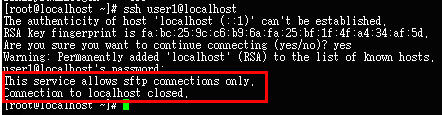
[#](#sftp-不允许-ssh-登录) sftp 不允许 ssh 登录 {#sftp-不允许-ssh-登录} ======================================================== 本文讲述如何使 ssh 账号无法登录,但是可以正常使用 sftp 服务。默认情况下,新增的系统用户可以使用 ssh 登录系统终端,也可以使用 sftp...
<h1>问题描述 {#问题描述}</h1> <p>使用SSH连接服务器时出现以下的警告信息:</p> <p>|---------------------------------------|-----------------------------------------------------------------...
<ol> <li>查看ssh服务的状态 {#1-查看ssh服务的状态} =============================</li> </ol> <p>输入以下命令:</p> <p>|-----------|----------------------------------| | &l...
参数说明 {#参数说明} ============ 测试ssh,需要使用类似以下内容的代码:`ssh -T user@domain.com` 根据man ssh: |-------------------|------------------------------------------------------------------------------------...
<h1>在 HTTPS 端口使用 SSH {#在-HTTPS-端口使用-SSH}</h1> <p>有时,防火墙会完全拒绝允许 SSH 连接。 如果无法选择使用<a href="https://docs.github.com/cn/github/getting-started-with-github/caching-your-g...

<h1>Windows使用远程桌面连接Ubuntu {#articleContentId}</h1> <p><a href="https://blog.csdn.net/luckyhaimian/article/details/137225903">Windows使用远程桌面连接Ubuntu_windows远程...
<p>Ubuntu 20.04 盒盖只锁屏</p> <h2><a href="#一、打开配置文件-logind-conf">#</a> 一、打开配置文件 <code>logind.conf</code> {#一、打开配置文件-logind-conf}</h2> &...
[#](#ubuntu-截图工具) ubuntu 截图工具 {#ubuntu-截图工具} ============================================ 本文讲述 linux 系统如何截图。介绍了多款截图工具。 [#](#shutter) shutter {#shutter} -------------------------------- sh...

<h1><a href="#centos6配置yum镜像仓库">#</a> centos6配置yum镜像仓库 {#centos6配置yum镜像仓库}</h1> <p>从2020年底开始centos6系统官方停止维护,且官方的yum源将停止服务,所以以后还想在centos6系统上使用yum,那么只能使...