

Centos6 Yum升级python2.6后 No module named cElementTree处理
#### 概述 由于服务器Centos6系统版本过低导致网络上不存在历史rpm版本的安装包,通过卸载并安装最新版python2.6后导致yum仍然无法继续使用。 [root@localhost ~]# yum list wget 已加载插件:fastestmirror, product-id, subscription-manager Updatin...
 51工具盒子
#### 概述 由于服务器Centos6系统版本过低导致网络上不存在历史rpm版本的安装包,通过卸载并安装最新版python2.6后导致yum仍然无法继续使用。 [root@localhost ~]# yum list wget 已加载插件:fastestmirror, product-id, subscription-manager Updatin...
<h4>概述</h4> <p>由于前同事升级Python版本至2.7.9导致原有的系统默认版本python异常,无法使用yum正常的功能。</p> <pre><code>[root@localhost ~]# yum update There was a problem importing one of t...
<h4>概述</h4> <p>由于需要开放telnet非默认端口,添加SElinux规则时报错。</p> <pre><code>[root@localhost ~]# semanage port -a -t telnetd_port_t -p tcp 23023 SELinux: Could not do...
<h4>概述</h4> <p>由于Centos7下root超级管理员密码忘记或被修改无法登录root用户,故编写该文档。</p> <h4>开始操作</h4> <h5>重启系统</h5> <p>在开机过程中,<strong>快速按下</strong>...
#### 概述 在编译时遇到如下报错内容: [root@localhost zabbix-3.2.11]# ./configure configure: error: working directory cannot be determined #### 排查思路 由于日志暂缺失,仅提供部分命令 ##### 查看具体报错信息 执行如下命令: ...

<h4>概述</h4> <p>日常巡检过程中发现系统存储空间已满,根据<code>du</code>命令发现<code>/var/lib/docker/containers/</code>目录占用存储过多。</p> <pre><code>[root@local...
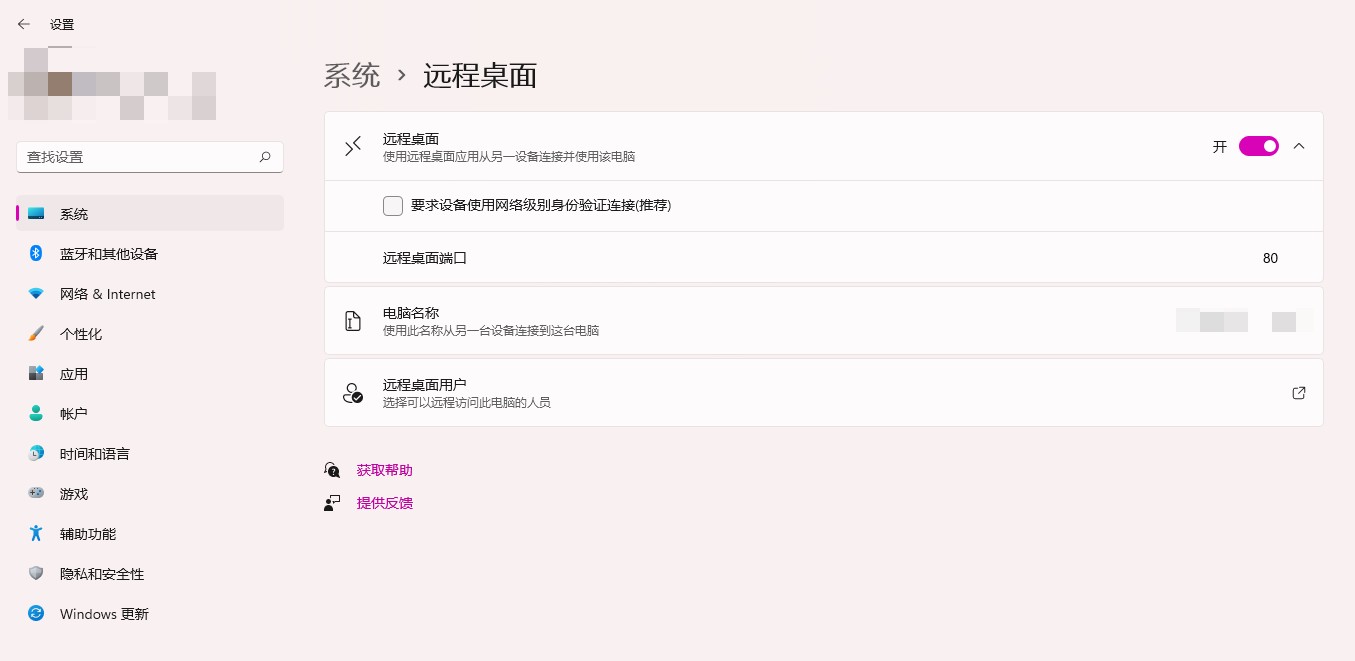
<h4>概述</h4> <p>由于需要进行远程端口访问修改默认端口设置,但系统默认页面无法直接进行修改。<br /> <img src="http://static.51tbox.com/static/2024-11-18/col/c3905e1c554c2d5ffa8135d27a7d363d/d6bf2b08f...
<h4>概述</h4> <p>由于需要下载docker镜像源,但是通过默认源地址下载缓慢。</p> <h4>开始配置</h4> <p>国内的镜像源有:</p> <ul> <li>docker官方中国区:<code>https://registry....

<h4>概述</h4> <p>于2021年9月3日windows11预览版更新补丁KB5006050后开机无法显示任务栏,资源管理器也无法使用。</p> <h4>解决办法</h4> <p>控制面板->时钟和区域->设置时间和日期。<br /> 将系统时间修...
<h4>概述</h4> <p>在本地终端或者远程终端时默认会显示一些信息,以下为默认终端登录页面:</p> <p><img src="http://static.51tbox.com/static/2024-11-18/col/1cec6ddaf44f6e90ca4ad0b1c53971be/8aa85...